Installation
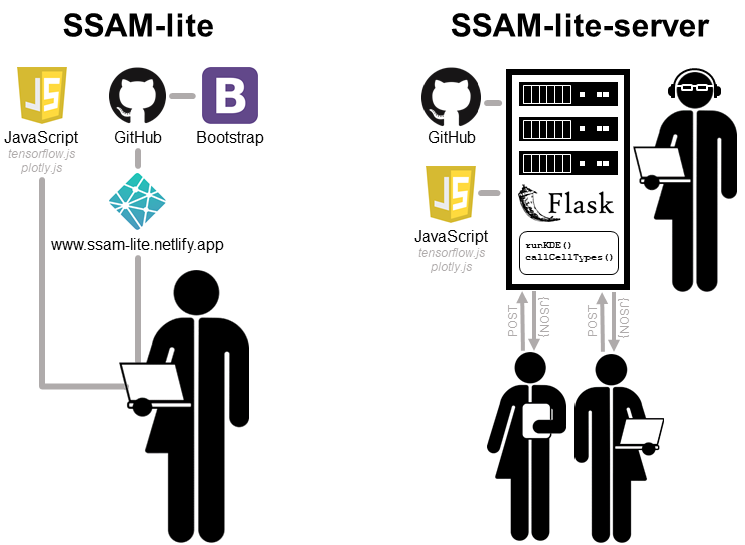
SSAM-lite comes in two flavours – SSAM-lite and SSAM-lite-server. While the usage is almost identical the installation differs quite a lot. If you need some help deciding which of the two fits your needs best and what the differences are follow the guide “Local or Server?”
Requirements
SSAM-lite and SSAM-lite-server should run on all modern browsers supporting JavaScript and WebGL. It has been verified to run on Firefox, Chrome, Edge and Safari.
SSAM-lite requires an internet connection to access the TensorFlow.js (v2.0.0) library.
SSAM-lite-server requires Python (v3.9.7) as well as the Python packages Flask (v0.8), pandas (v1.3.2), NumPy (v1.20.3), and Numba (v0.53.1). It also requires the TensorFlow.js (v2.0.0), Plotly (v2.5.1), and Bootstrap (v4.0.0) JavaScript libraries. However, these will be downloaded upon first setup and after that, no internet connection is required anymore.
SSAM-lite
SSAM-lite is accesible via https://ssam-lite.bihealth.org, and does not need to be installed.
However, if you want to have a local copy of the code or run an older version, installation is possible and could not be easier. You either clone the GitHub repository
git clone https://github.com/HiDiHlabs/ssam-lite.git
or click here to download it as zip-file from GitHub and then extract it.
That is literally all, you are ready to go.
SSAM-lite-server
To install SSAM-lite-server you first need to clone the GitHub repository
git clone https://github.com/HiDiHlabs/ssam-lite-server.git
Next, we change into the cloned directory, create a conda environment including
all packages and dependencies, and activate it.
cd ssam-lite-server
conda env create -f environment_ssam-lite-server.yml
conda activate ssam-lite-server
Note
You can adjust the YAML file to set the environment name to your preferences. Or alternatively, create your own environment and install the required Python version and packages with the following command.
conda install python=3.9.7 flask=0.8 numpy=1.20.3 pandas=1.3.2 numba=0.53.1
We also retrieve the static files required by SSAM-lite-server including the Bootstrap, Plotly and TensorFlow.js JavaScript libraries.
python fetch_static_files.py
Finally, start the Flask app (the default port will be 5000).
export FLASK_APP=run.py
flask run
Note
The port and further settings can be made in the run.py file or when starting the app with
flask run. For further information we would refer the reader to the
Flask documentation.