Local or Server?
This page is meant to help you explain the differences between SSAM-lite and SSAM-lite-server.
First of all, it is important to note that both are (currently) equivalent in functionality. So the decision will not be based on what you want to do with it but rather how you want to use and deploy it.
Nevertheless, it might make sense to have a look at what might be better suited to your needs.
Note
If you want to test SSAM-lite we recommend you first try the SSAM-lite implementation as their is no setup required. After that you can still come back and checkout the server version.
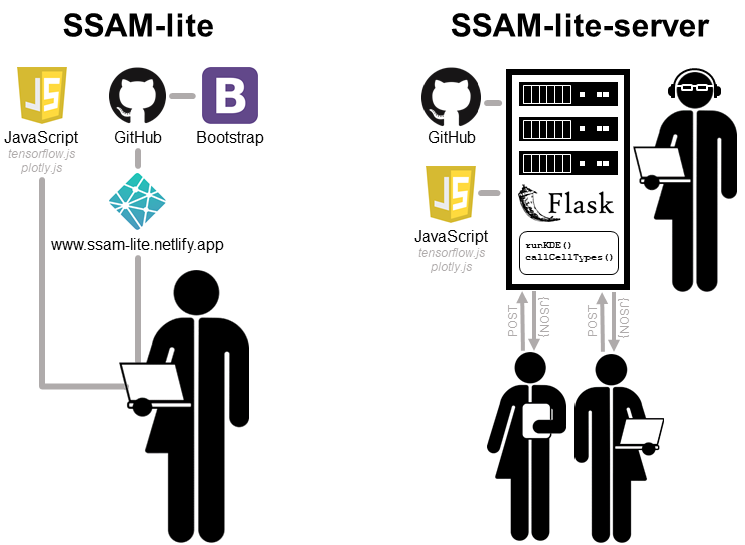
SSAM-lite (local)
- Advantages
No installation: Because you only need to open the provided website, you can start your analysis in less than a minute. Even if you decide to download the source code it should not take much longer.
- Use case
For all researchers that want to get started right away or are the only ones in their group/department analysing spatial transcriptomics data.
SSAM-lite-server
- Advantages
Deploy for multiple users: The server version can be setup on a server once and then served to multiple users within the network.
Higher compute power: In most cases you will have a higher compute power (especially memory, which will usually be the main limitation) available if you run it on a server and not e.g. a laptop.
No internet required: After installation and setup of SSAM-lite-server no internet connection will be required anymore.
- Use case
This can be deployed on e.g. an institute server to be used by a research group, a core facility, or a whole department/institute. It only needs to be installed once and can be served to all users in the network as WebApp. The users will only require a local network connection to communicate with the server but no internet access which makes it suitable for networks with restricted internet access such as hospitals.